
دانلود Mestrelab Research Mnova 16.0 نرم افزار آنالیز اطلاعات NMR ،GC ،MS ،LC

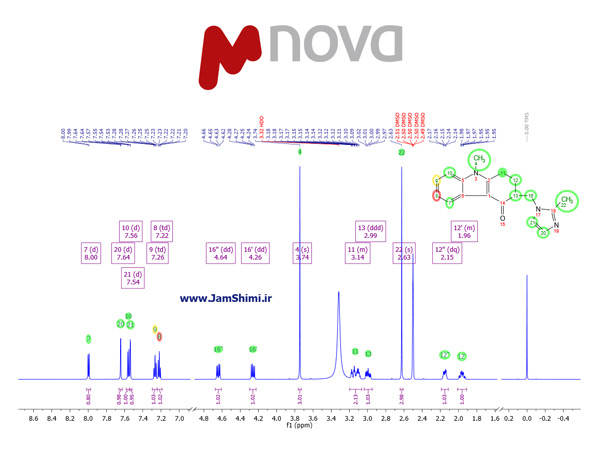
Mestrelab Research Mnova نرم افزار تخصصی شیمی یا نرم افزار MestReC برای بررسی و تجزیه و تحلیل اطلاعات خروجی از نرم افزارهای NMR ،GC،MS ،LC می باشد. در ورژن جدید نرم افزار Mnova StereoFitter همراه با نرم افزار Mestrelab Research Mnova 15.0.0 Build 34764 قرار داده شده است که همراه پلاگین های حرفه ای خود اطلاعات بسیار جامعی در مورد طیف های NMR و همین طور گوسین در اختیار پژوهشگران قرار می دهد. به همراه نرم افزار Mnova لایسنس آن نیز وجود دارد که در پوشه Licenses تعداد 45 عدد از لایسنس های مورد نیاز و کاربردی این نرم افزار به شرح زیر قرار داده شده است. در ورژن جدید لایسنس Mnova IUPAC Name برای تولید نام ترکیبات بر اساس قوانین آیوپاک قرار داده شد. نرم افزار MestReC تمام اطلاعات مورد نیاز هر دانشجو و شیمیست در زمینه برررسی طیف های NMR و Mass Spectroscopy و… را در اختیار می گذارد.
لیست تغییرات و امکانات ورژن جدید- کلیک کنید
- New Command Palette feature: A new search-based input bar has been added to Mnova, allowing users to quickly find and execute any functionality by typing keywords.
Activate it using the shortcut “Ctrl + .”.
Command options appear after typing three or more characters. For example, typing “peak picking” displays all related commands, which can be selected and executed directly with Enter. Character accents are ignored (e.g., á = a).
Filter functionalities are also available before typing three characters:
r + Enter – Filter by recent: Displays the 20 most recently executed commands.
e + Enter – Filter by enabled: Shows only actions that are currently available.
p + Enter – Filter by plugin: Shows commands available from the selected plugin only.
a + Enter – Remove filters: Resets the filter state.
New Advanced Plug-ins Status Indicator icon: A new icon has been added to the Mnova status bar (bottom right corner) to display the status of your Mnova Advanced Plug-ins using a color code:
Dark grey: No status data available – This should only occur when Mnova is just started.
Green: All Mnova Advanced Plug-ins are up to date.
Red: At least one update is available but has not performed.
Yellow: A restart is required to complete update operations (e.g., after manually adding a new plug-in).
Orange: A combination of red and yellow – updates are available, and a restart is needed.
Double-clicking the icon opens the Advanced Plug-ins dialog, where users can view available and installed plug-ins and perform updates if needed.
MSChrom
- Updated OpenLab converter: The opelab282mcds converter has been updated to version 2.0.1.63, adding support for OpenLab CDS 2.8 and including bug fixes.
- Renamed Column in “Molecule Match: Calculate From Molecular Formula…” dialog: In the Molecule Match dialog, the column previously labeled as “Weight” has been renamed to “Monoisotopic Mass” to more accurately reflect its content.
- Improved Automatic Trace Alignment via Scripting (JavaScript Engine): The applyAutomaticTraceAligment JavaScript function has been enhanced to match the performance of the Automatic Trace Alignment available in the Mnova GUI.
- Support for Waters OpenLynx/MassLynx .rtp files: Mnova now supports Waters .rtp files (OpenLynx/MassLynx), with metadata correctly displayed in the Parameters table.
NMR
- New Mnova import/export NMR format: Allotrope ASM: Mnova now supports the Allotrope Simple Model (ASM) format for importing and exporting NMR data. ASM is a JSON-based standard designed to represent instrument data in a structured and interoperable way.
- Exporting features:
- Experiment metadata (1D and 2D NMR experiments)
- Processing parameters (1D and 2D NMR experiments)
- Peak and multiplet analysis (only for 1D NMR experiments)
- Improved display of HOESY experiments: Mnova now correctly displays HOESY (Heteronuclear Overhauser Effect SpectroscopY) experiments in the Parameters table.
Python Engine
- The Python Engine, originally introduced in Mnova 15.1, has been significantly improved in Mnova 16 with enhanced performance, expanded documentation, and a collection of new example scripts that showcase how to automate tasks and interact with Mnova via Python.
- New Python scripts examples: A variety of new example scripts are now available in the Mnova installation folder:
- C:\Program Files\Mestrelab Research S.L\MestReNova\examples\scripts\py
applicationInfo.py – Prints the Mnova version.
dialogTest.py – Demonstrates how to use dialog windows.
documentInfo.py – Displays information about the current document, pages, and items.
drawingTools.py – Creates shapes, imports images, and adds text.
get1DNmrSpectrumParam.py – Retrieves 1D NMR spectrum parameters.
getNmrPeaksInformation.py – Displays all NMR peak information in the document.
loadUi.py – Loads and displays a previously created UI file.
molecule.py – Retrieves information about the active molecule on the page.
msBlindRegions.py – Adds Blind regions to chromatographic data.
msDataPoints.py – Retrieves data point arrays (X and Y) from a chromatogram and prints the point with the highest Y value.
nmrBlindRegions.py – Adds blind regions to NMR spectra.
nmrSpectrum.py – Accesses intensity values within an NMR spectrum.
openFile.py – Uses a file dialog to import a dataset into Mnova.
These are in addition to the example scripts released with Mnova 15.1.
Scripting Engine
- New scripting properties for Integral class: The Integral class for 1D experiments now includes three new scripting properties: bias, slope, and autoAdjust, enabling extended functionality via scripting.
Mgears 2.7
- Direct data input from LOGS and ZONTAL: Mgears can now retrieve input data directly from LOGS or ZONTAL data management platforms for analysis, simplifying data integration workflows.
- Introducing portable Mgears settings: Mgears scripts, templates, and auxiliary files can now be saved and shared as part of the Mgears settings (.mgrs files), which simplifies sharing and re-using methods significantly.
- New NoSQL DB Connector: A new NoSQL database connector has been added to Mgears for saving analysis results. This feature will enable Mgears users to utilize all the capabilities of NoSQL databases, such as searching, comparing results, fast reviewing, retrieving statistics, and more.
- New input file format: An Mgears metadata file (.mgm) in JSON format, containing dataset-specific metadata, can now be used to pass metadata to Mgears, streamlining data input processes.
- New metadata file support in Mgears: Mgears now supports a new metadata file type (.mgm in JSON format), enabling users to pass structured metadata into workflows. These files are automatically detected in batch, real-time, and command-line modes, and their content is integrated into Mgears’ internal parameters, indexed by group name. This enhancement streamlines metadata handling and improves automation in analytical processes.
- Result folder replacement: The output tab now includes a “wipe folder” option to remove previous analysis with the same nickname when saving new results.
- Results table filter: A filter is now available under the Results Table in the Viewer to allow user search and locate specific filenames using “Title” and “Document” fields.
- Interface improvements: The Mgears interface has been refined to improve both appearance. Enhancements include the removal of unnecessary lines, standardization in a cleaner, more cohesive layout and smoother user experience.
- Search and filter capability in Mgears Viewer Results Table: A new filter option has been added below the Results Table in Mgears Viewer, allowing users to quickly search and locate specific entries – particularly useful when handling large sets of results. The table can now be filtered by values in the “Title” and “Document” columns, significantly improving navigation and usability.
Mnova Hub 1.1
- New LOGS provider: LOGS has been added as a new provider for Mnova Hub.
- ZONTAL provider enhancements: The ZONTAL provider has been significantly improved to offer a more intuitive and efficient user experience, along with expanded file support.
- .zip file support: Can now open ‘.zip’ files containing ‘.mnova’ files.
- Generic Search: New option to search across all available fields in ZONTAL.
- Expanded Dynamic Filters: Two new fields added:
- Preferred Label
- Information Package Profile
- With these additions, all ZONTAL columns are now available as filterable fields.
- Improved results navigation: The previous drop-down page selector has been replaced with a spinbox to facilitate quicker navigation through search results.
- Show/Hide button: A new Show/Hide button has been added to toggle data previews (available for all providers except LOGS).
Chrom Cal 1.1
- Multiple Targets and Calibration Curves: Multiple targets per sample can now be analyzed together, with individual calibration curves generated for each.
- Use of Internal Standard: It is now possible to use one or multiple internal standards for calibrations.
- A Quadratic Polynomial Model: A Quadratic polynomial model has been implemented, allowing calibration adjustments alongside the Linear model.
- Accurate compound identification via specific m/z values: Compounds and Internal Standards can now be identified using precise m/z values.
- Retention Time (RT) as Input Parameter: RT single values or ranges are now accepted as identifier parameter for input.
- Inspect Calibrations Feature: A new “Inspect Calibrations” button has been added, allowing users to check the calibration and validation points associated with each target in their analysis.
- Chromatogram Trace Selection: Users can now select the Total Ion Chromatogram (TIC) or Base Peak Chromatogram (BPC) as quantitation trace.
- Peak Picking and Mol Match Settings: The Peak Picking and Mol Match settings are now accessible within the plugin, allowing streamlined configuration and saving of distinct settings for different experiments.
qNMR 3.3.0
- qNMR – Concentration:
- Warning for Non-FID data: A warning message is now shown when performing concentration analysis using processed spectra (1r or 2rr): “Warning: The loaded data is not a FID. Suggestion: Use raw data instead”.
- More precision and resized CCF box: The number of decimal places for the CCF (Concentration Correction Factor) has increased, and the CCF box has been resized for better visibility.
- Autoset tool warning: An additional warning is now displayed when trying to open the Autoset tool from a blank page.
- Optimized report generation: The report generated after a concentration analysis has been optimized for better clarity and performance.
- Multiplet zoom functionality: Users can now zoom into multiplets by double-left clicking on specific columns in the results table (Multiplet, Autoselected, Shift, and Range). A zoom factor selector has also been added. To restore the default view, simply double-right click in the results table.
- New Report Template: A new report has been added to Concentration, matched to the report used in Gears Concentration.
- Option to discard unassigned multiplets: A new setting in both Concentration and Purity Settings (Advanced Plugins and bricks for Mgears) dialogs allows users to automatically exclude unassigned multiplets from the analysis.
- Gears – Concentration:
- User-Friendly format for .data file: ‘.data’ files used to save Concentration Settings and Purity Settings are now stored in a more readable and user-friendly format, making them easier to interpret in text editors.
- Option to discard unassigned multiplets: A new setting in both Concentration and Purity Settings dialogs allows users to automatically exclude unassigned multiplets from the analysis.
- qNMR – Purity:
- Export to CSV in Purity Results Table: A new button has been added to the Purity results table, allowing users to export the table contents to a CSV file.
- Support for metadata object: Purity now supports the use of metadata object as the primary method for retrieving analysis parameters.
- Improved Advised Calculations tab: The Advised Calculations tab in the Purity Settings dialog now includes:
- Tooltips in the Integration Method and Custom Analysis Settings sections.
- A redesigned Custom Analysis Method section, now presented as a pop-up activated via an Advanced button.
- qGSD removed from recommended settings: The qGSD option has been removed from the “Use recommended settings” list in the Advised Analysis section from the Purity Settings dialog.
- Experiment window enhancements: Several improvements have been made to the Experiment window:
- Reference Details and Sample Details tooltips have been simplified with:
- “Integration options”
- “Peak Picking and Multiplet Analysis options”
- The button to remove a row from the multiplet table is now disabled until a row is selected.
- New Reference and Sample Detail panels: Two new panels have been added to the Edit Experiment/Create Experiment dialog, displaying detailed Reference and Sample information.
- Column header width retention in Purity Results table: The Purity Results table now retains custom column header widths specifically when opening and closing the Purity Table Setup. Adjusted widths remain preserved, regardless of whether changes are applied in the setup dialog.
- Updated Reference Compound metadata parameters – (Also applies for Gears Purity): The metadata parameters “Concentration Reference” and “CR” are now deprecated as valid identifiers for the Reference Compound in the References Library and in the Parameters table comments field. The accepted parameter names are now: Reference Compound, RC, Reference Name, RN, and Reference.
- Option to discard unassigned multiplets: A new setting in both Concentration and Purity Settings dialogs allows users to automatically exclude unassigned multiplets from the analysis.
- Gears – Purity:
- Enhanced visualization of replicas analysis in the Mgears Viewer: When performing a replicas analysis using Purity for Mgears, the Viewer now provides improved result visualization of results:
- Overall replicas results are displayed directly in the Well Plate cells.
- The replicas statistics table is now shown in the Purity Results.
- Option to discard unassigned multiplets: A new setting in both Concentration and Purity Settings dialogs allows users to automatically exclude unassigned multiplets from the analysis.
برای دانلود Mestrelab Research Mnova 16.0 نرم افزار آنالیز اطلاعات NMR ،GC ،MS ،LC روی لینک های دانلود کلیک کنید.
لینک کوتاه مطلب
دانلود MestReC Mnova نسخه ویندوز + راهنمای نصب فارسی دانلود MestReC Mnova نسخه macOS+ راهنمای نصب فارسی


با سلام
ممنون و متشکر
بسیار عالی بود
با سلام و وقت بخیر
فایل NMR با پسوند jdf. رو نمیشناسه. لطفا راهنمایی بفرمایید
با سلام
برای این نوع فایل باید پلاگین NMR نصب باشه.
سلام من هر 3 تا ورژن Mnova رو نصب کردم در بخش لایسنس به مشکل خوردم هر مدل ک میشد بهشون اضافه کردم ولی اصلا نمیشناسه و فایلای طیف رو باز نمیکنه لطفا کمکم کنید
سلام
آیا فایل های کرک جایگزین کردید؟
با سلام. من هم نیز فایل رو نصب کردم. پلاگین هم فعاله ولی باز میگه فایل شناخته شده نیست. توی صفحه تون چیزی به اسم فایل راهنما ندیدم. میشه راهنمایی کنیدکه فایل راهنما رو از کجا می تونم بیبنم؟
سلام
طبق فایل تکست موجود در پوشه اکسترکت شده نرم افزار، کرک را نصب و فعال کنید.
سلام
من میخوام این نرم افزار نصب کنم میگه قسمت سوم نرم افزار به اسم shimadzo نیست
میشه راهنمایی بفرمایین؟
سلام
نرم افزار کامل دانلود کردید؟
طبق فایل راهنما اقدام به نصب کنید
نرم افزار نصب شده لایسنس و پلاگین ها هم فعال ولی فایل fid باز نمیکنه و پشتیبانی نمیشه
علتش چیه ?
به صورت درگ به داخل نرم افزار بکشید و تست کنید
سلام برای مک نسخه ای نیست همراه با کرک؟
با سلام
بزودی نسخه مک با کرک در سایت قرار می گیرد.
سلام. من برنامه رو نصب کردم اما باز هم در مورد لایسنس ها ارور میده
سلام
لایسنس ها اوکی هست
لطفا طبق فایل راهنما، اقدام به نصب کنید
سلام
خسته نباشید
من نرمافزار مستر نووا 14.1.2 رو دانلود کردم اما لایسنس ندارم میشه لطف کنید بفرستید وراهنمایی کنید که چجوری وارد کنم؟
سلام
لطفا نرم افزار از سایت ما در بخش لینک های دانلود همین پست دانلود نمایید. در لینک دانلود تمامی لایسنس های نرم افزار قرار داده شده
موفق باشید.
سلام
من این نرمافزار رو روی لپتاپ خودم نصب کردم .
فایلها رو با چه فرمتی میتونم از سیستم دانشگاه انتقال بدم رو لپتاپ؟
(دستگاه HPLC هست)
لطفا لایسنس iupac name generator برای mnova رو هم قرار بدید.خیلی به این پلاگین نیاز هست
سلام
چشم حتما
سلام
در آخرین ورژن 14.1.1 پلاگین و لایسنس درخواستی شما قرار داده شد.
فایل فشرده نرم افزار پس از دانلود کامل باز نمی شود و غیر فعال است
برای اکستراکت فایل از نرم افزار Winrar ورژن 5.5 به بالا استفاده کنید. راهنمای دانلود مطالعه بفرمایید.